

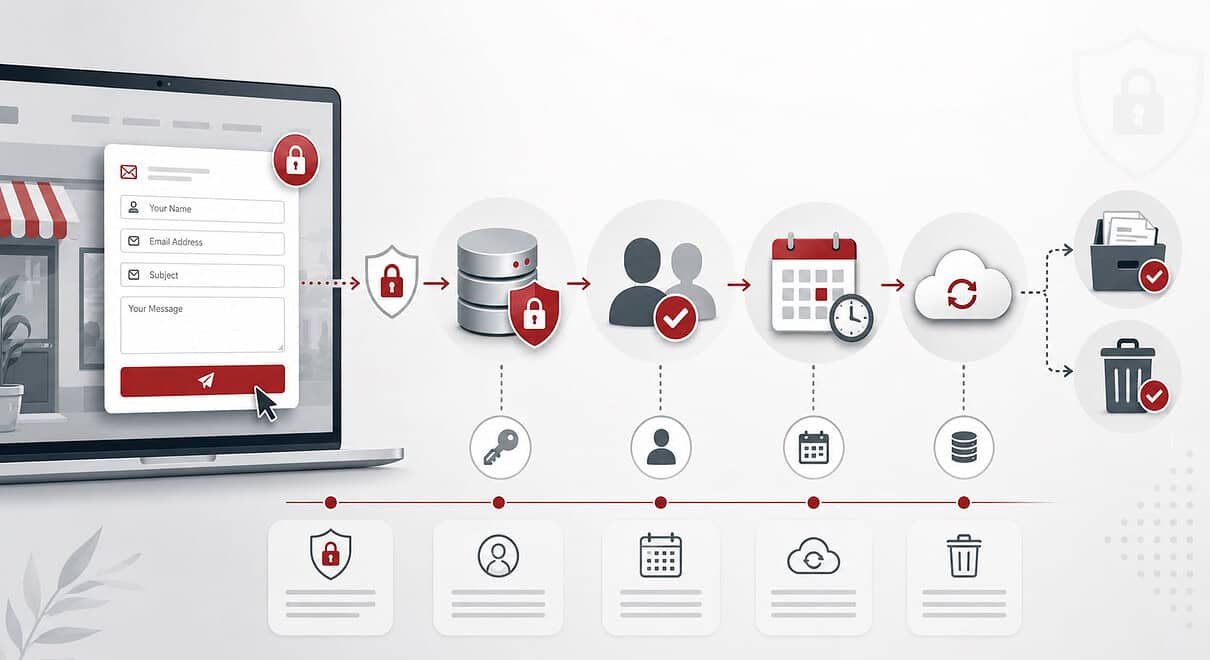
Someone visits your website, fills in the contact form and presses send. The enquiry arrives in your inbox, you reply and the conversation moves on. As far as the customer is concerned, the form has done its job.
The information they entered may have a much longer life.
Depending on how the website is set up, the same enquiry could still be stored in the website database. A copy may be sitting in your email account, included in a website backup or passed through an external email or spam-filtering service. If the enquiry develops, somebody may copy the details into another system or forward the original message to a colleague.
Months later, the enquiry itself may be forgotten while the information behind it is still sitting in several places.
This is an easily missed part of website information security. Keeping a website secure is not only about stopping somebody from breaking into it. Once a website collects personal information, the business also needs to know what it is collecting, why it needs it, where it goes, who can access it and when there is no longer a good reason to keep it.
For a small business website, following one ordinary contact-form submission from beginning to end is a surprisingly useful place to start.
The message may be finished before the data is
The first decision happens before anybody presses send: what are you asking them to give you?
Contact forms have a habit of growing. A simple name, email address and message becomes a telephone number, company name, job title, full address, budget, preferred contact method and several questions about the project. Some of that information may genuinely make an enquiry easier to handle, but every additional field also creates another piece of personal information for the business to manage.
UK data protection law includes the principle of data minimisation. The information collected should be adequate and relevant for the purpose, but limited to what is actually necessary. In practical terms, each field should have a reason for being there rather than being collected because it might be useful later.
There is a website benefit to this too. A customer who simply wants to ask whether you can help should not have to complete half a client-onboarding process before they can speak to you. Collecting less information can reduce the amount you need to protect while also making the enquiry route easier to use.
You also need a valid lawful basis for collecting and using personal information, and the basis should fit what you are actually doing rather than being chosen as an afterthought. Consent is not automatically required just because a form is online; the correct basis depends on the purpose and circumstances.
The person completing the form should also be told what will happen to their information. The ICO says privacy information should be provided when personal information is collected directly from someone, including through a form, and should cover matters such as the purpose, retention period and who the information may be shared with. A privacy policy hidden somewhere in the footer is not enough on its own if people are not made aware of it and given an easy route to it.
The useful question at this stage is therefore not simply whether the form works. It is whether everything being collected has a job once it reaches the other side.
There is no universal retention period for contact forms
This is where many websites quietly accumulate information.
A WordPress form plugin, for example, may store submissions in the website as well as emailing them. That can be useful because an enquiry is not lost if the email fails to arrive. The problem starts when storing the submission has become the default but deleting it has never become anybody’s responsibility.
UK GDPR does not say that ordinary contact enquiries must be kept for 30 days, six months or one year. The storage-limitation principle is based on purpose instead: personal information should not be kept for longer than it is needed, businesses should be able to justify their retention periods, and standard retention periods should be set where possible. Information should then be reviewed and erased or anonymised when it is no longer required.
That means the sensible retention period depends on what happened to the enquiry.
A message asking whether you cover a particular area that went no further may have very little continuing value. An enquiry that became a live project may form part of a wider customer record that needs to be retained for different reasons. A spam submission is different again. Treating all three as “contact-form entries” misses the reason the information is being held.
A small business does not necessarily need a complicated records-management system to deal with this. What it does need is a deliberate decision. If unsuccessful enquiries are kept for a particular period, know what that period is and why. If successful enquiries move into another business record, know what happens to the original submission afterwards. Your privacy information should reflect the reality rather than describe a retention approach that nobody is actually following.
The original contact-form submission also reminds us why deleting one record may not be the end of the story. Removing it from WordPress does not remove the email sitting in an inbox or a copy that has already been exported elsewhere.
Backups deserve particular attention. They exist precisely because they preserve information that might otherwise be lost, so deletion may not always happen in the same way as it does on a live website. ICO guidance recognises that information can remain in backup environments until it is overwritten, but the backup needs to be managed through an established retention schedule and the information kept beyond normal use in the meantime.
The better retention question is therefore not “How long does our contact-form plugin keep submissions?”
It is “How long does our business keep the information that arrived through this form, wherever that information now lives?”
That small distinction changes the review from a WordPress setting into something much more useful.
While you keep the information, protect it properly
Once there is a legitimate reason to hold information, the next job is making sure it is appropriately protected.
There is no single security configuration that suits every website. A straightforward brochure website collecting names, contact details and ordinary enquiries is dealing with a different level of risk from a website handling customer accounts, financial information, sensitive documents or health information. UK GDPR takes a risk-based approach and requires appropriate technical and organisational measures rather than prescribing one identical setup for every organisation.
For many small business websites, some of the most useful questions are quite ordinary. Who can log into the website? Who can see stored form submissions? Does somebody who only updates pages need administrator access? Are accounts belonging to former staff, freelancers or previous agencies still active?
The ICO specifically points to controlling access, removing unused accounts, using appropriate authentication and considering stronger authentication such as two-factor authentication for privileged access.
The website itself also needs looking after. Software updates, supported plugins and themes, secure hosting and sensible account management are not separate from information security when the website is storing personal information. HTTPS and encryption matter too, but the padlock in the browser should not create a false sense that the whole job is finished. Encryption can protect information in transit and at rest; it does not decide whether the business needed to collect the information, whether ten people can access it or whether it should have been deleted two years ago.
Then there are the other services behind the form. The enquiry may pass through the web host, an email provider, spam prevention, a form service or another platform. You do not need to turn every website review into a map of the entire internet, but you should know which suppliers are processing personal information for the business and what happens to that information when a service is changed or closed. Where a supplier is acting as a processor, UK GDPR requires the relationship to be covered by the appropriate contractual terms.
Finally, there needs to be some thought about what happens if information is exposed, lost or accessed by the wrong person. A personal data breach is not limited to a dramatic website hack; sending personal information to the wrong recipient or accidentally exposing records can also be a breach. Not every breach has to be reported to the ICO, but organisations need to assess the likely risk. Where the reporting threshold is met, notification must be made without undue delay and, where feasible, within 72 hours of becoming aware of the breach. Breaches should also be recorded even where notification is not required.
What connects all of these things is not a particular plugin or security product. It is knowing what information the website is holding and retaining control of it while it is there.
Follow one enquiry from beginning to end
Go back to that person who filled in the contact form at the start.
Rather than beginning with a huge compliance exercise, follow their enquiry through the website and the business. Look at the form they completed, then look behind it. Where was the submission stored? Who received it? Which other systems got a copy? Who can see those systems today? What happens to the information if the enquiry goes nowhere, and what changes if that person becomes a customer?
A useful review should leave you able to answer:
- What personal information does each website form collect, and why do we need it?
- Where is that information stored or sent after the form is submitted?
- What lawful basis are we relying on to use it?
- What have we told the person about that use?
- Who can access the information, and do they still need that access?
- How long will we keep it, and what is the reason for that period?
- What happens to copies in email, other systems and backups?
- Which external suppliers are processing it for us?
- What happens when the retention period ends?
- Do we know what we would do if that information were lost or exposed?
If those questions have clear answers, the website is already in a much healthier position.
The point is not to turn a simple contact form into something frightening or unnecessarily complicated. It is to stop an ordinary website feature quietly becoming a store of personal information that nobody has thought about for years.
A contact form should make it easier for somebody to start a conversation with a business. Once that conversation has moved on, the information left behind should still have a reason to be there.
Know what you collect. Know where it goes. Protect it while you need it. Delete it when you no longer do.
That is a much more useful way to think about information security on a business website than simply checking whether there is a padlock next to the address.
This article provides general information rather than legal advice. ICO guidance was checked in August 2026. Some ICO data-protection guidance remains under review following changes introduced by the Data (Use and Access) Act 2025.
